

Submit Your Review
Share your experience with our team.
Blogs
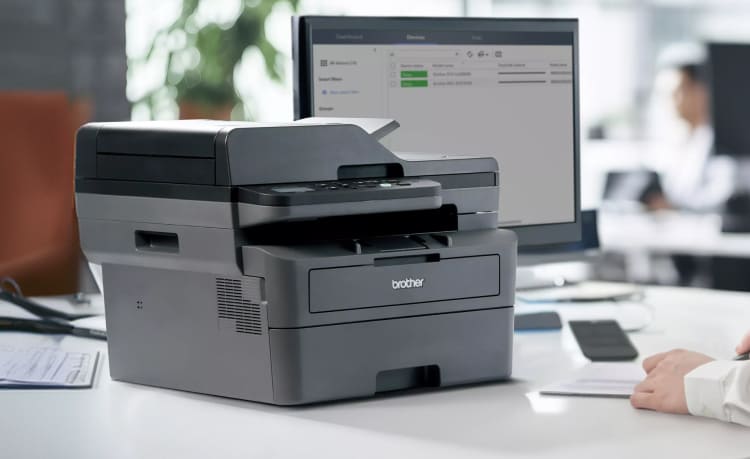
How the DCP-L2640DW Simplifies Printing, Scanning, and Copying for Small Businesses
Introduction
Small businesses depend on efficiency to stay competitive. From printing invoices and contracts to scanning customer records and copying important paperwork, everyday office tasks require equipment that is reliable, easy to use, and capable of handling multiple functions. Instead of purchasing separate devices for printing, scanning, and copying, many businesses now prefer multifunction printers that combine everything into one compact solution.
The DCP-L2640DW Laser Multifunction Printer is designed with productivity in mind. It combines fast monochrome laser printing, high-quality scanning, copying capabilities, wireless connectivity, and automatic duplex printing into a single device. Whether you're running a startup, managing a home office, or operating a growing business, this printer helps streamline document management while saving both time and workspace.
Let's take a closer look at why the DCP-L2640DW is an excellent choice for small businesses.
A Complete Multifunction Office Solution
One of the biggest advantages of the DCP-L2640DW is its ability to perform multiple tasks from one machine.
It allows users to:
- Print business documents
- Scan important paperwork
- Copy files quickly
Having these functions available in a single device eliminates the need for additional office equipment. This not only reduces costs but also helps keep your workspace organized and clutter-free.
Fast Printing for Busy Workdays
Time is valuable in every business. Waiting for documents to print can slow down productivity and interrupt daily operations.
The DCP-L2640DW is built to deliver fast monochrome printing, making it suitable for offices that regularly produce:
- Invoices
- Contracts
- Purchase orders
- Reports
- Employee records
- Shipping labels
- Financial statements
Its quick performance allows employees to complete printing tasks efficiently and move on to more important responsibilities.
High-Quality Monochrome Output
Professional documents reflect the professionalism of your business.
The DCP-L2640DW produces:
- Crisp black text
- Sharp graphics
- Clean business reports
- Easy-to-read forms
Laser printing technology ensures consistent output, making it ideal for documents that require a polished appearance. Whether you're preparing proposals for clients or printing internal reports, the results remain clear and professional.
Scan and Copy with Ease
Businesses frequently need to digitize paperwork or duplicate important documents.
The DCP-L2640DW includes built-in scanning and copying functions that simplify tasks such as:
- Scanning signed agreements
- Copying identification documents
- Digitizing receipts
- Archiving paperwork
- Creating duplicate business forms
Having these capabilities readily available improves workflow and reduces dependence on external scanning services.
Automatic Duplex Printing Saves Resources
Paper costs can add up over time, especially for businesses that print regularly.
The DCP-L2640DW includes automatic duplex printing, allowing documents to be printed on both sides of the paper without manual intervention.
Benefits include:
- Lower paper consumption
- Reduced printing costs
- Less paper waste
- Professional-looking reports and presentations
For businesses focused on sustainability and cost savings, duplex printing is a valuable feature.
Wireless Connectivity for Flexible Printing
Modern offices often include multiple computers, laptops, smartphones, and tablets.
The DCP-L2640DW supports wireless connectivity, making it easy for multiple users to print without physical cable connections.
Employees can print directly from:
- Desktop computers
- Laptops
- Smartphones
- Tablets
Wireless functionality provides greater flexibility and allows teams to access the printer from different locations within the office.
Compact Design for Small Workspaces
Office space is often limited, especially for startups and home-based businesses.
Despite offering multiple functions, the DCP-L2640DW features a compact design that fits comfortably on:
- Office desks
- Reception counters
- Small workstations
- Shelving units
Its space-saving design allows businesses to maximize their available workspace without sacrificing functionality.
Reliable Performance for Daily Operations
A business printer should perform consistently day after day.
The DCP-L2640DW is designed for dependable operation, making it suitable for businesses that handle routine document printing throughout the week.
Its durable laser printing technology helps minimize downtime, ensuring employees can continue working without frequent interruptions.
Reliability is especially important for businesses that depend on timely document processing.
Easy Setup and Simple Operation
Installing office equipment shouldn't require advanced technical knowledge.
The DCP-L2640DW offers a straightforward setup process that includes:
- Connecting to the office Wi-Fi network
- Installing the necessary drivers
- Configuring print settings
- Starting print jobs within minutes
The intuitive control panel makes everyday operation simple, allowing users to quickly access printing, scanning, and copying functions.
Who Should Buy the DCP-L2640DW?
Small Business Owners
Businesses that print invoices, contracts, receipts, and operational documents every day will appreciate the printer's speed and multifunction capabilities.
Home Office Professionals
Remote workers who frequently scan signed documents, print reports, and make copies can complete all these tasks from a single device.
Retail Stores
Retail businesses often print receipts, shipping labels, inventory reports, and purchase records. The DCP-L2640DW provides reliable monochrome printing for these daily operations.
Educational Institutions
Schools and training centers regularly print worksheets, examination papers, administrative documents, and instructional materials.
Its multifunction features make it a practical solution for educational environments.
Tips for Maintaining the DCP-L2640DW
To ensure long-term performance:
- Use high-quality paper designed for laser printers.
- Replace toner cartridges when print quality begins to decline.
- Keep the scanner glass clean for accurate scans.
- Store paper in a dry environment.
- Avoid overfilling the paper tray.
- Update printer drivers regularly.
- Perform routine maintenance according to the manufacturer's recommendations.
Regular maintenance helps preserve print quality and extends the lifespan of the printer.
Pros
- Print, scan, and copy in one device.
- Fast monochrome laser printing.
- Automatic duplex printing.
- Wireless connectivity for multiple users.
- Compact design suitable for small offices.
- Professional-quality document output.
- Easy setup and user-friendly controls.
Things to Consider
- Prints only in black and white.
- Not intended for photo printing.
- Best suited for office documents rather than graphic-intensive projects.
Final Verdict
The DCP-L2640DW Laser Multifunction Printer is an excellent choice for small businesses, home offices, and professionals who need a dependable all-in-one document solution. By combining printing, scanning, and copying into a single compact device, it simplifies everyday office tasks while helping businesses save valuable workspace.
Its fast monochrome printing, automatic duplex feature, wireless connectivity, and consistent print quality make it well-equipped for handling routine business operations efficiently. Whether you're processing invoices, scanning contracts, or copying important paperwork, the DCP-L2640DW delivers reliable performance that supports productivity.
For businesses looking for an affordable and practical multifunction laser printer, the DCP-L2640DW offers a strong balance of performance, convenience, and long-term value.