

Submit Your Review
Share your experience with our team.
Blogs
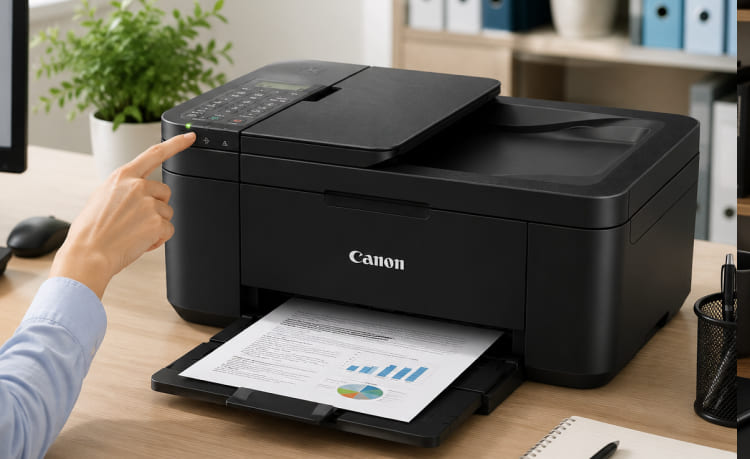
Top Reasons to Choose the PIXMA TR4720 for Your Home Office
Introduction
A home office requires more than just a computer and an internet connection. Whether you're managing a small business, working remotely, or handling personal paperwork, having a dependable all-in-one printer can significantly improve your productivity. The ability to print, scan, copy, and fax from one device saves time, reduces clutter, and simplifies everyday tasks.
The PIXMA TR4720 All-in-One Printer is designed to meet the needs of home office users by combining essential document management features with wireless convenience. Its compact design, automatic document feeder (ADF), and mobile printing capabilities make it an excellent choice for professionals who need reliable performance without investing in bulky office equipment.
Let's explore what makes the PIXMA TR4720 a smart addition to any home office.
A Complete All-in-One Printing Solution
The PIXMA TR4720 is more than just a printer. It combines multiple office functions into one compact machine, allowing users to:
- Print documents
- Scan paperwork
- Copy files
- Send and receive faxes
Instead of purchasing separate devices, users can manage all their document-related tasks with a single machine. This not only saves money but also helps keep your workspace organized.
Designed for Home Office Productivity
Working from home often means handling a variety of tasks throughout the day. From printing contracts and invoices to scanning signed documents, efficiency is essential.
The PIXMA TR4720 is built to support daily office activities such as:
- Printing business reports
- Creating client proposals
- Copying legal documents
- Scanning receipts
- Faxing important paperwork
Its versatile functionality makes it suitable for freelancers, entrepreneurs, remote employees, and home-based businesses.
Automatic Document Feeder Saves Time
One of the standout features of the PIXMA TR4720 is its Automatic Document Feeder (ADF).
Instead of placing each page on the scanner one at a time, the ADF allows users to scan or copy multiple pages automatically.
This feature is particularly useful for:
- Contracts
- Financial records
- School documents
- Client paperwork
- Business forms
The ADF helps reduce manual effort and allows users to complete larger tasks more efficiently.
Wireless Printing for Greater Flexibility
Today's home offices often include multiple devices, including laptops, smartphones, and tablets.
The PIXMA TR4720 supports wireless printing, making it easy to print documents without connecting cables.
Users can print from:
- Windows computers
- Mac devices
- Smartphones
- Tablets
Wireless connectivity also allows multiple users to share the printer within the same network, making it convenient for households with more than one remote worker or student.
High-Quality Print Output
Professional-looking documents leave a lasting impression.
The PIXMA TR4720 produces:
- Crisp black text
- Sharp graphics
- Rich color prints
- Clear images
Whether you're printing invoices, business presentations, school projects, or family photos, the printer delivers consistent results suitable for both personal and professional use.
Compact Design for Smaller Workspaces
Many home offices have limited desk space.
The PIXMA TR4720 features a compact footprint that fits comfortably on:
- Office desks
- Study tables
- Shelves
- Small workstations
Despite its compact size, it includes essential business features that users typically expect from much larger office printers.
Mobile Printing Convenience
Modern professionals often work directly from mobile devices.
The PIXMA TR4720 supports mobile printing, allowing users to print documents stored on smartphones or tablets without transferring files to a computer.
This feature is useful for quickly printing:
- Email attachments
- Meeting agendas
- Travel documents
- Shipping labels
- Photos
- PDF files
Mobile printing adds convenience and flexibility to everyday workflows.
Easy Installation and User-Friendly Operation
Not everyone is comfortable installing office equipment.
Fortunately, the PIXMA TR4720 is designed for easy setup.
Users can quickly:
- Connect the printer to Wi-Fi
- Install the printer software
- Configure printing preferences
- Start printing within minutes
Its intuitive controls make daily operation simple, even for first-time users.
Built for Everyday Reliability
Consistency is one of the most important qualities of a home office printer.
The PIXMA TR4720 is designed to handle routine printing tasks with dependable performance.
Whether you're printing a few pages each day or preparing weekly reports, the printer provides reliable operation without unnecessary complexity.
Its durable design makes it suitable for regular home office use.
Who Should Buy the PIXMA TR4720?
Remote Employees
Professionals working from home can easily print reports, scan documents, and send signed paperwork without visiting a print shop.
Small Business Owners
Entrepreneurs who manage invoices, contracts, shipping labels, and customer documents will appreciate the printer's versatile functionality.
Students
College students and researchers can use the printer for assignments, study materials, presentations, and scanning important academic documents.
Families
Families benefit from having one printer capable of handling school projects, household paperwork, photos, and occasional office work.
Tips for Maintaining Your PIXMA TR4720
To ensure consistent performance:
- Keep the printer connected to a stable Wi-Fi network.
- Use quality paper to improve print results.
- Replace ink cartridges before they run completely dry.
- Clean the scanner glass regularly.
- Keep the Automatic Document Feeder free from dust and debris.
- Update printer drivers whenever new versions become available.
- Print regularly to prevent ink from drying inside the printhead.
Proper maintenance can extend the life of the printer and maintain excellent print quality.
Pros
- Print, scan, copy, and fax in one device.
- Automatic Document Feeder for multi-page documents.
- Wireless printing from multiple devices.
- Compact design ideal for home offices.
- Sharp document and color print quality.
- Easy installation and simple operation.
- Suitable for personal and professional use.
Things to Consider
- Best suited for moderate printing volumes.
- Ink cartridges require periodic replacement.
- Not designed for heavy-duty commercial printing environments.
Final Verdict
The PIXMA TR4720 All-in-One Printer offers an impressive combination of functionality, convenience, and reliability for home office users. With features like wireless printing, an Automatic Document Feeder, scanning, copying, and built-in fax capabilities, it provides everything needed to manage daily document tasks efficiently.
Its compact design makes it ideal for smaller workspaces, while its user-friendly interface ensures that setup and operation remain straightforward for users of all experience levels. Whether you're a remote employee, student, freelancer, or small business owner, the PIXMA TR4720 delivers dependable performance and practical features that help streamline your workflow.
If you're looking for an all-in-one printer that balances versatility, quality, and ease of use, the PIXMA TR4720 is a strong choice for any modern home office.